

AI-native development is transforming software creation. Here, AI is the foundation. Instead of hand-coding, developers and non-developers define their goals, and AI builds the implementation. Now, many tasks move from idea to working prototype through prompts, making manual coding optional.
This matters because it drastically shortens development timelines, reduces costs, and unleashes business innovation at new speeds. Complete applications can now be delivered in hours, not weeks. Companies in Bangladesh and globally are racing to adopt this approach to stay ahead of the competition. This article will define AI-native development, explain how it works, and demonstrate its differences from low-code and no-code development, citing expert sources and providing links to Implevista’s related services.
What Is AI-Native Development?
AI-native development refers to building software with AI at its core. Instead of treating AI as a bolt-on (like adding a chatbot to an existing app), AI-native systems embed AI into the design, architecture, and workflow from day one. In practice, this looks like:
- Natural language inputs: Developers (or business users) describe the desired feature in plain English.
- AI code generation: An AI tool translates that description into working code, including front-end and back-end logic.
- Continuous AI assistance: AI helps with testing, debugging, documentation, and even deployment decisions.
A helpful way to understand this is to compare two approaches:
- AI-Enabled (Traditional): AI is a feature or add-on. For example, you might attach an AI-powered translation API to your app after it has been built. The core development process is still manual coding.
- AI-Native: AI is part of the engine. You might have an IDE or platform where you simply specify a “user login” feature, and the AI creates the database schema, UI, and authentication code automatically.
Gartner has identified “AI-native development platforms” as a top trend for 2026, noting they “use generative AI to create software faster and easier than was previously possible.”

AI Code Generation Tools: The New Dev Helpers
At the heart of AI-native development are AI code generation tools. These are advanced AI systems (often powered by large language models) that can produce source code from prompts. Think of them as an autopilot for coding. Popular examples include GitHub Copilot (built on OpenAI Codex), TabNine, and other AI assistants.
What can these tools do?
- Generate boilerplate code: Need a REST API endpoint or a data model class? Describe it, and the AI spits it out.
- Autocomplete & suggestions: As you code, the AI autocompletes lines and suggests improvements in real time, much faster than traditional IDE autocomplete.
- Bug detection and fixes: Some tools analyze code and propose fixes or more efficient implementations.
- Cross-language translation: They can even convert code from one programming language to another or adapt code to different frameworks.
GitLab’s developer guide puts it well: “AI code generation tools can quickly produce boilerplate code and pieces of code for repetitive tasks, freeing developers to focus on more complex requirements”.
Moreover, these tools aren’t just fast; they can improve quality. Because AI models are trained on vast amounts of open-source code, they often generate code that follows industry best practices and standards. GitLab notes that AI-generated code often has “fewer potential errors” and “follows best practices around security and design patterns,” which leads to “faster debugging and higher overall code quality”.
No-Code AI Development: Build Without Coding
No-code AI development is transforming how software is created. Instead of writing code, you simply describe what you want, and the system builds it for you. Earlier no-code platforms relied on drag-and-drop interfaces, but AI takes this further. Now, you can type requests like “Create a lead dashboard with weekly email reports” or “Build an online store with inventory and payments,” and the platform assembles the app automatically.
The process works through natural language input, ready-made components such as payments, login, or data tools, and automated setup, testing, and deployment. This approach makes software creation accessible to anyone, not just developers.
The main beneficiaries include startups and SMEs that want to launch quickly with minimal resources, business users—often called citizen developers—without coding skills, and enterprises that aim to empower teams to solve problems independently. In many cases, AI handles most of the work, with developers stepping in only to fine-tune or customize complex features.
Low-Code vs AI-Native Development: What’s the Difference?
| Approach | Drag-and-drop using pre-built components | Describe the requirements, and AI generates the solution |
| Coding | Some coding for complex features | Minimal to none |
| Speed | Faster than traditional coding | Much faster with full automation |
| User Skill | Requires technical understanding | Accessible to non-technical users |
| Automation | Partial (UI, workflows) | High (coding, testing, deployment) |
| Customization | Limited by templates | Highly flexible, AI can create custom solutions |
| Control | More manual control | AI-driven execution |
| Best Use | Structured business apps | Rapid prototypes and complex solutions |
When we talk about low-code vs AI-native development, it’s important to understand that both trends aim to reduce manual coding, but in different ways.
What is Low-Code Development?
- Visual design: Low-code platforms use drag-and-drop interfaces for UI, workflows, and data models.
- Some coding required: You can often insert custom code for complex parts, but much is handled by pre-built components.
- Faster delivery: Low-code still requires developer logic, but it cuts down on repetitive tasks.
- Typically enterprise-focused: Often used by companies to speed up app delivery without sacrificing too much control.
What is AI-Native Development?
- AI-driven generation: Instead of dragging components, you describe the feature in natural language or call APIs, and AI writes the code.
- Minimal to no coding: You might add code only to fine-tune or for very specialized logic. The AI generates everything else.
- High automation: Testing, optimizing, and even deploying can be handled by AI agents.
- Accessible to non-developers: Non-technical staff can theoretically build applications by instructing the AI.
Key differences:
- Control vs Speed: Low-code gives more explicit control over each part, while AI-native emphasizes speed and ease.
- Role of user: Low-code usually still expects someone with tech savvy (maybe a developer or analyst) to piece together components. AI-native could let a business user define features by talking to the system.
- Customization: Low-code apps are often limited by the platform’s templates. AI-native outputs can, in principle, be any code the AI has learned.
- To use an analogy: Low-code is like using a framework with templates (e.g., constructing a LEGO building block-by-block). AI-native is like handing a blueprint or a verbal spec to an autonomous builder that has a full workshop and says, “Build it for me.”
Low-Code vs AI-Native: Which One to Choose?
For most organizations, it’s not an either/or—it’s a matter of which tool fits the problem:
- Use Low-Code when: You have in-house developers or IT teams who want speed but still need control and custom integrations. Examples: complex enterprise workflows, systems that require strict compliance.
- Use AI-Native when: You want maximum speed and prototyping, and you have a clear outcome in mind. Examples: MVPs for startups, non-coding business users creating internal tools, or projects where any working solution is better than a perfect one.
Often the best approach is hybrid: Start with AI-native tools to quickly prototype, then refine the solution with low-code or traditional development as needed. As Implevista’s development team can attest, many companies combine methods to hit deadlines without sacrificing quality.
Why Writing Code Is Becoming Optional
Coding isn’t disappearing—but for many tasks, it’s no longer necessary. Here’s what’s driving that shift:
- Natural Language–Driven Development
Modern AI understands plain language. Instead of writing syntax-heavy code, you can describe what you need—like “show top-selling products for January”—and the system generates the logic for you.
- Context-Aware Code Generation
Today’s AI tools analyze your existing codebase and structure. They produce solutions that align with your project, including proper naming, dependencies, and error handling.
- Automation of Repetitive Development Tasks
Much of development involves routine work—setting up databases, APIs, validations, and UI components. AI can generate these instantly, saving significant time and effort.
- Accelerated Prototyping and Iteration
AI enables teams to quickly turn ideas into functional prototypes. This allows faster testing, feedback, and continuous improvement.
- Shift Toward High-Level Engineering Focus
Developers are spending less time on manual coding and more on architecture, system design, and strategic decision-making.
- Expanded Access to Software Development
AI lowers technical barriers, allowing non-developers to build applications and workflows without deep coding expertise.
- Rapid Advancement of AI Development Ecosystems
Major technology platforms are continuously improving AI-powered tools, making manual coding less essential for many standard use cases.
The Business Impact of AI-Native Development
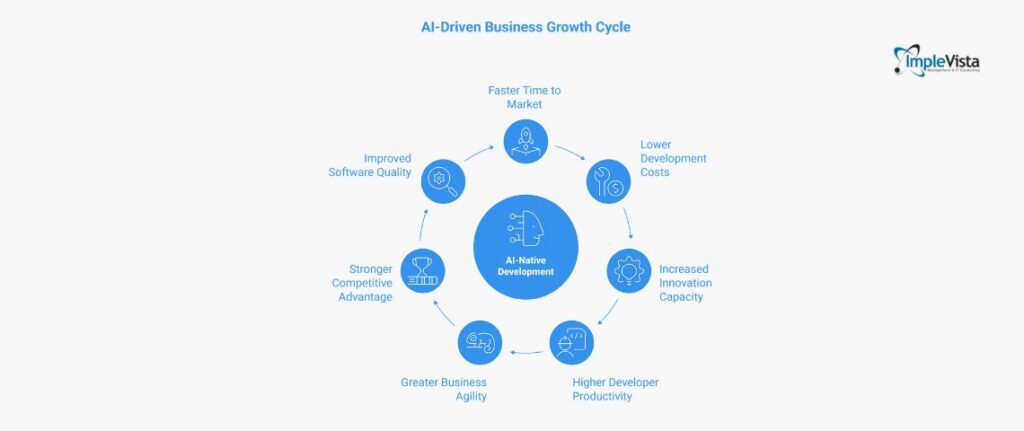
AI in development isn’t just a tech upgrade—it directly affects how fast and efficiently a business grows.
- Faster Time to Market
AI speeds up development cycles. Features that once took weeks or months can now be launched in days, helping businesses stay ahead.
- Lower Development Costs
With AI handling much of the work, companies spend less on long development cycles. This makes advanced solutions more affordable, especially for SMEs.
- Increased Innovation Capacity
Teams can test multiple ideas at once instead of committing to one. This leads to faster experimentation and better chances of success.
- Higher Developer Productivity
Developers get more done by letting AI handle routine tasks. The same team can deliver significantly more output.
- Greater Business Agility
Companies can quickly adapt to changes—whether it’s customer needs or market trends—by updating products faster.
- Stronger Competitive Advantage
Businesses using AI can automate processes, personalize services, and scale faster—giving them an edge over competitors.
- Improved Software Quality
AI helps maintain consistency, catch errors early, and even generate tests, leading to more reliable and stable products.
Challenges and Best Practices
AI-native development is powerful—but it’s not flawless. Here’s what to watch for and how to handle it:
- Quality and Accuracy Issues
AI can generate code that looks right but has flaws. Always review and test it—treat it like junior-level output.
- Security Concerns
AI may miss proper validation or safe practices. Regular security checks and testing are still essential.
- Skill Dependency Risks
Relying too much on AI can weaken core coding skills. Teams should understand and refine AI output, not just accept it.
- Limits in Complex Use Cases
For highly customized or performance-heavy systems, human expertise is still necessary. AI works best as a starting point.
- Too Many Tools, Less Clarity
Using multiple AI tools can create confusion. It’s better to stick to a few well-integrated platforms.
Best Practices to Follow:
- Set clear coding standards for AI-generated output
- Use automated testing and CI/CD pipelines
- Keep developers involved for validation and decision-making
- Train teams to use AI tools effectively
The Future of Software Development
The direction is clear: AI will handle more of the building, while humans focus on thinking and guiding.
- Developers as System Designers
Developers will focus more on architecture and logic, while AI handles most of the coding work.
- Intent-Driven Development
Instead of writing code, you describe what you want. AI turns those instructions into working solutions.
- More Powerful AI Capabilities
AI is getting better at handling complex tasks and longer workflows, making it possible to build entire features end-to-end.
- New Roles in Tech Teams
Roles like AI specialists and prompt engineers will grow as companies rely more on AI-driven development.
- AI Tools Become Standard
Just like version control today, AI assistants will be a normal part of every development workflow.
- Less Manual Coding Over Time
Routine coding tasks will fade. Developers will spend more time solving complex problems, not writing basic code.
- Expansion Across Industries
AI-driven development will spread beyond tech into sectors like finance, retail, travel, and healthcare.
Implementing AI-Native Strategies at Implevista
Implevista follows an AI-first approach, embedding intelligence into every stage of development. From travel software to enterprise systems, each solution is designed to be faster, smarter, and closely aligned with real business needs.
The focus goes beyond simple code generation. Every implementation is context-aware, ensuring AI-driven outputs match the client’s workflows, industry demands, and long-term goals. This leads to practical, usable systems instead of generic solutions.
At the team level, developers act as AI orchestrators. They guide and coordinate multiple AI tools to design, build, and refine complex applications efficiently.
Implevista also prioritizes continuous learning. By staying updated with the latest technologies and frameworks, the team keeps its AI-native approach modern and competitive.
In essence, the strategy combines human expertise with AI capability to deliver faster, smarter, and scalable solutions.
FAQs: AI-native development
- What is AI-native development?
AI-native development is building software with AI integrated at every step. Instead of manually coding each feature, developers define the goal, and AI generates or assists with the implementation.
- Is coding becoming obsolete?
Not completely. Coding remains important for custom and complex tasks. But for many standard features, AI tools can generate code, making manual coding optional for those parts.
- What are AI code generation tools?
They are AI-powered assistants (like GitHub Copilot or OpenAI Codex) that automatically write code based on your input (often natural language). They speed up development by handling boilerplate and suggesting fixes.
- What is no-code AI development?
No-code AI development lets non-developers build apps by describing requirements in natural language. The AI-driven platform assembles the app without any hand-coding. It’s like telling an AI what you want and letting it build it.
- How does AI-native differ from low-code?
Low-code uses visual drag-and-drop and requires some coding; it still follows a framework. AI-native uses AI to generate code, requiring little to no manual programming. Low-code helps you write less code; AI-native often lets you skip writing code for many tasks.
- Are AI-generated applications reliable?
They can be, but should be tested. AI often produces working code, but developers need to review it. According to a survey, trust in AI code is cautious: only ~33% of devs fully trust AI-generated output. Best practice is to treat AI code like regular code: test and secure it.
- Who benefits most from AI-native development?
Businesses of all sizes benefit. Startups and SMEs can launch products faster without big dev teams. Non-technical teams (marketing, HR) can prototype tools. Enterprises can boost developer productivity. Implevista serves many clients by enabling faster, AI-augmented development.
- What industries are adopting AI-native development?
Nearly all. Tech companies started it, but travel, finance, healthcare, retail, and others are adopting AI-assisted dev. For example, travel agencies use AI in Implevista’s IV Trip platform to automate bookings and recommendations.
- Is AI-native development secure?
Security depends on implementation. AI can introduce vulnerabilities if unchecked. It’s crucial to apply standard security practices: code reviews, static analysis, and tests. In fact, integrating security into the AI workflow (as a “guardrail”) is becoming common.
- What skills do developers need for AI-native dev?
Developers need strong problem-solving and design skills, plus an understanding of AI tools. They should be good at writing precise prompts/specs, reviewing AI output, and focusing on higher-level architecture. Traditional coding skills are still useful for complex parts, but engineers will also take on roles like prompt engineering and AI supervision.
The era of manual coding is sunsetting, but the era of creation is just beginning. By embracing AI-native development, businesses can unlock levels of productivity and
innovation that were previously unimaginable. Whether you are looking to revamp
your travel tech or build a groundbreaking SaaS platform,
The tools are now in your hands.
Ready to
leapfrog your competition?
Don’t get
left behind in the world of manual syntax. Contact Implevista today to explore how our
AI-native development experts can transform your vision into a high-performance reality.