

The Ultimate Guide to Shopify Performance Optimization for Faster eCommerce Stores
In the fast-paced ecosystem of digital retail, time directly translates to revenue. When a potential customer visits an online store, a business has mere seconds to capture their attention. If a website takes too long to load, the consumer will invariably close the tab and navigate to a competitor. Consequently, Shopify performance optimization has shifted from being a technical luxury to an absolute business necessity.
Whether an organization is launching a boutique digital storefront or managing a high-volume enterprise platform, understanding the mechanics of Shopify performance optimization represents the defining line between a thriving operation and a high rate of abandoned shopping carts. Modern consumers demand efficient browsing, instant image rendering, and a seamless checkout experience. Meeting these rigorous standards requires a strategic, highly dedicated approach to platform speed.
This comprehensive guide examines why infrastructure speed serves as the backbone of digital retail success. The following sections provide an in-depth analysis of actionable workflows, proven ecommerce performance-optimization methodologies, and essential Shopify performance optimization tips designed to streamline operations. Furthermore, the analysis highlights how partnering with an established Shopify development company in Bangladesh, such as Implevista, can elevate digital storefront efficiency to achieve optimal operational capacity.
Why Shopify Performance Optimization is Critical for Your Business
To understand the true value of Shopify performance optimization, we need to look beyond the technical jargon and focus on the two things that matter most to any ecommerce business: sales and visibility.
- The Direct Impact on Conversion Rates
E-commerce is driven by immediacy. When a customer decides to buy something, any friction in the process significantly increases the likelihood of cart abandonment. According to industry studies, a site that loads in one second has an e-commerce conversion rate that is up to five times higher than a site that takes ten seconds to load.
When your store is slow, visitors get frustrated. A delay of just one second in page response can result in a 7% reduction in conversions. If your Shopify store generates $10,000 a day, a one-second delay could cost you over $250,000 in lost sales every single year. Shopify performance optimization directly recovers that lost revenue by providing a frictionless, immediate shopping experience.
- Search Engine Optimization (SEO) and Discoverability
Your website’s speed does not just impact the people who are already on your site; it determines how many people find your site in the first place. Search engines like Google are entirely focused on providing their users with the best possible results. If Google sends a user to a slow, unresponsive website, it reflects poorly on their search engine.
Because of this, Google uses page speed as a primary ranking factor. If your store suffers from bloated code and unoptimized media, you will be penalized in the search rankings, pushing your products below your faster competitors. Effective ecommerce performance optimization ensures that search engine crawlers can index your site efficiently, boosting your organic visibility and driving free, high-intent traffic to your product pages.
- Lower Advertising Costs
Many store owners do not realize that a slow website actually makes digital advertising more expensive. Platforms like Google Ads assign a “Quality Score” to an online store based on how fast and helpful the webpage is for visitors. If a landing page takes too long to load, shoppers get frustrated and leave immediately. Google tracks this quick exit, assumes the website is a poor match for users, and lowers the score.
When that score drops, the advertising platform penalizes the business by charging more money for every single ad click just to maintain its position in the search results. By investing in Shopify performance optimization, a business keeps shoppers happy and browsing longer. This boosts the Quality Score, lowers the overall cost of running ads, and significantly increases the return on marketing investments.
Understanding Core Web Vitals for Shopify Stores
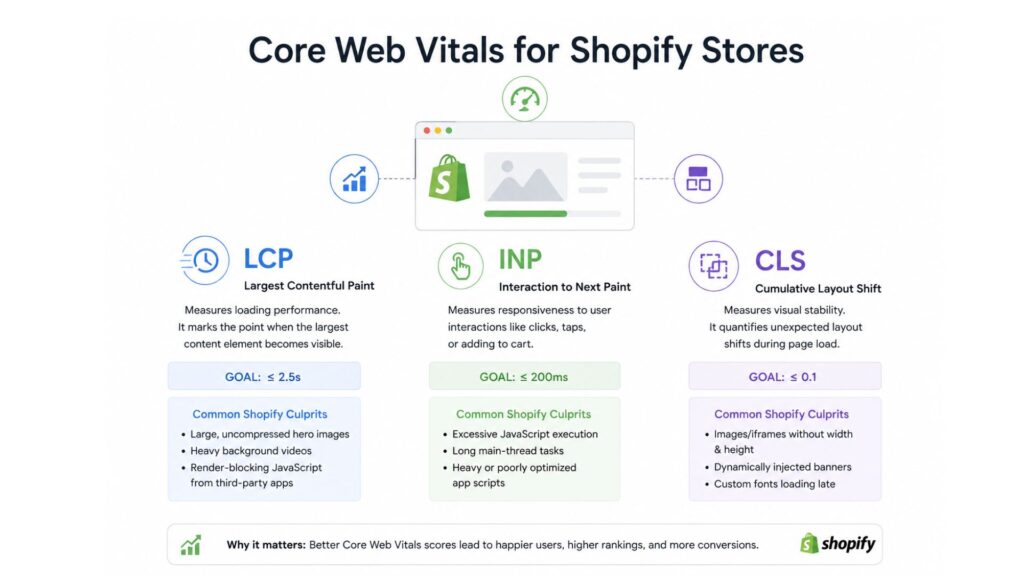
You cannot manage what you cannot measure. When it comes to Shopify performance optimization, the gold standard for measurement is Google’s Core Web Vitals. These are a set of specific, user-centric metrics that quantify the real-world experience of interacting with a web page.
Optimizing your Shopify store means mastering these three core pillars:
Largest Contentful Paint (LCP)
LCP measures loading performance. Specifically, it marks the exact point in the page load timeline when the largest text block or image element becomes visible within the user’s screen.
- The Goal: To provide a good user experience, your LCP should occur within 2.5 seconds of when the page first starts loading.
- Common Shopify Culprits: Massive, uncompressed hero banner images, heavy background videos, and render-blocking JavaScript from third-party apps.
Interaction to Next Paint (INP)
Replacing the older First Input Delay (FID) metric, INP measures a page’s overall responsiveness to user interactions. It assesses how quickly your website responds when a user clicks a button, taps a menu, or adds an item to their cart.
- The Goal: An INP of 200 milliseconds or less indicates a highly responsive page.
- Common Shopify Culprits: Excessive JavaScript execution. If the browser’s main thread is busy processing a clunky app script, it cannot respond to the user’s click, making the site feel “frozen.”
Cumulative Layout Shift (CLS)
CLS measures visual stability. Have you ever been reading a webpage, and suddenly a late-loading image or ad pops up, pushing the text down and causing you to lose your place? Or worse, causing you to click the wrong button? That is a layout shift.
- The Goal: Your store should maintain a CLS score of 0.1 or less.
- Common Shopify Culprits: Images or embedded iframes without defined width and height dimensions, dynamically injected promotional banners, and custom web fonts loading late.
By focusing your ecommerce performance optimization efforts on these three metrics, you are ensuring that your site is not just technically fast but also perceptually fast and enjoyable for the end-user.
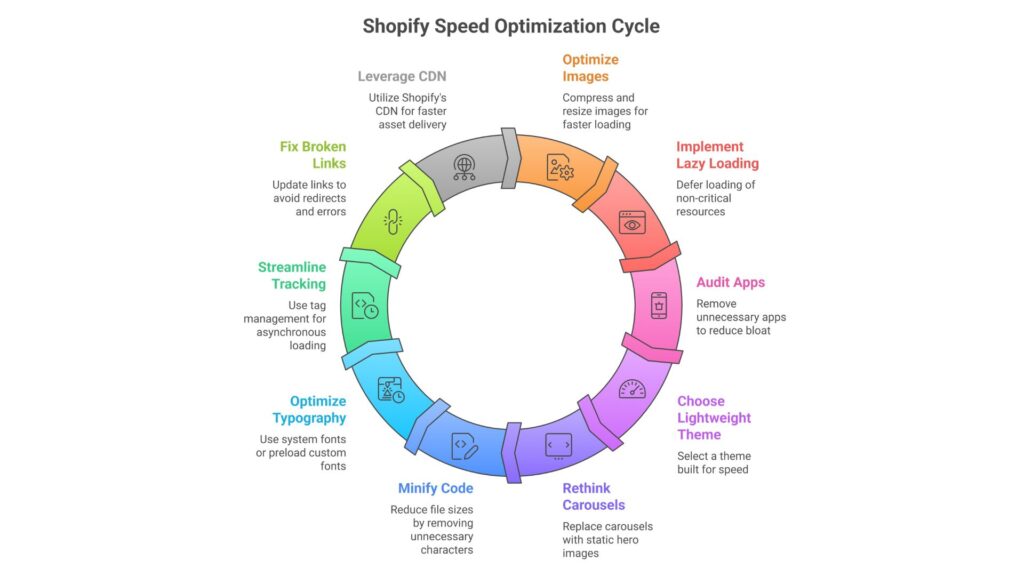
10 Actionable Shopify Performance Optimization Tips for Lightning-Fast Stores
Now that we understand the stakes and the metrics, let’s roll up our sleeves. Implementing the following Shopify performance optimization tips will drastically reduce your load times and elevate your customer experience.
- Master Image and Media Compression
Images usually account for 50% to 75% of a webpage’s total weight. High-resolution product photography is essential for sales, but uploading 5MB raw image files will cripple your site speed.
- Use Next-Gen Formats: Always serve images in modern formats like WebP or AVIF, which provide superior quality at a fraction of the file size compared to traditional JPEGs or PNGs.
- Resize Before Uploading: Do not rely on CSS to resize a massive image down to a thumbnail. Resize the image to its maximum display dimensions before uploading it to Shopify.
- Compress: Use tools like TinyPNG or dedicated Shopify apps like Crush pics to automatically compress media upon upload.
- Implement Native Lazy Loading
If a customer lands on your homepage, there is no reason their browser should immediately download the images located all the way down in your site’s footer.
Lazy loading is a technique that defers the loading of non-critical resources (like images and videos that are “below the fold”) until the user actually scrolls down and needs to see them. This drastically improves your initial page load time and your LCP score. Modern Shopify themes often include this natively, but it is a critical step in Shopify performance optimization.
- Audit and Eliminate App Bloat
The Shopify App Store is a blessing and a curse. It is incredibly easy to add reviews, live chats, pop-ups, and countdown timers to your store with just one click. However, every single app injects its own JavaScript and CSS into your theme.
Over time, this creates “app bloat,” resulting in competing scripts that drag down your site speed.
- Conduct an Audit: Go through your app list right now. If an app is not directly generating revenue or saving you significant operational time, delete it.
- Check for Leftover Code: Unfortunately, simply uninstalling an app does not always remove its code from your theme files. You may need a developer to manually clean your theme. liquid file to remove orphaned scripts.
- Choose a Lightweight, Modern Theme
Your theme is the foundation of your store. No amount of Shopify performance optimization can save a theme that is fundamentally built on outdated, bloated code.
Avoid themes that come packed with hundreds of “built-in” features, flashy animations, and complex sliders. Instead, opt for Shopify’s “Online Store 2.0” themes, such as Dawn. These themes are built specifically for speed, utilizing modular architecture and loading JavaScript only when strictly necessary.
- Rethink Carousels and Hero Sliders
Auto-playing image carousels at the top of your homepage are terrible for performance and notoriously bad for conversions. They require heavy JavaScript to run, they force users to download multiple massive images, and data shows that users rarely click past the first slide anyway.
Replace your heavy slider with a single, highly optimized static hero image and a clear, compelling Call to Action (CTA). Your LCP score will thank you.
- Minify CSS, JavaScript, and HTML
When developers write code, they use spaces, line breaks, and comments to make it readable for humans. Browsers, however, do not need any of that. Minification is the process of stripping out all unnecessary characters from your code, reducing file sizes, and allowing the browser to parse the site faster.
While Shopify handles some minification automatically on its servers, working with an expert development team can help you consolidate files and defer non-essential JavaScript to ensure critical rendering paths are clear.
- Optimize Your Typography
Custom web fonts look beautiful, but they carry a performance cost. When a browser has to download a custom font file from a third-party server (like Google Fonts), it can cause the text on your page to be invisible for a moment (known as the Flash of Invisible Text, or FOIT), ruining your LCP and CLS scores.
Whenever possible, utilize system fonts (fonts already installed on the user’s device, like Arial, Helvetica, or San Francisco). If you must use custom web fonts, ensure you are preloading them and using the CSS property so text is visible immediately while the custom font loads in the background.
- Streamline Your Tracking and Analytics
Every e-commerce store needs tracking—Google Analytics, Meta Pixel, TikTok Pixel, Klaviyo trackers, etc. However, hardcoding these individually into your website header creates a massive bottleneck for the browser.
Use a tag management system like Google Tag Manager (GTM). GTM allows you to load these tracking scripts asynchronously, meaning they load quietly in the background without stopping the rest of your website from rendering visually for the customer.
- Fix Broken Links and Minimize Redirects
Every time a customer clicks a link that redirects them (a 301 redirect), it adds an extra HTTP request and delays the page load. Even worse are 404 broken links, which waste your server’s crawl budget and frustrate users.
Regularly use tools like Ahrefs, SEMrush, or broken link checkers to scan your site. Update internal links to point directly to the final destination URL, bypassing the redirect chain entirely. This is a subtle but highly effective Shopify performance optimization tactic.
- Leverage Shopify’s Native Global CDN
Shopify utilizes a world-class Content Delivery Network (CDN) powered by Cloudflare. A CDN stores cached copies of your website’s static assets (like images and CSS) on servers distributed all over the globe. When a customer in London visits your site, they download the files from a server in the UK, rather than your main server in the US.
Ensure that you are not hosting images or assets externally on third-party servers. Upload everything directly into Shopify’s file system so you can take full advantage of their lightning-fast CDN architecture.
Shopify Speed Optimization for Small Businesses
A common misconception is that enterprise-level speed requires an enterprise-level budget. This simply is not true. Shopify speed optimization for small businesses is highly achievable by focusing on the fundamentals.
Small businesses actually have an agility advantage. Unlike massive corporations with rigid IT structures and thousands of legacy product pages, a small business can pivot quickly. If you are running a boutique store, your fastest path to optimization is ruthless simplicity.
- Strip away the complex design elements.
- Limit yourself to two or three essential apps (e.g., an email marketing app and a review app).
- Focus heavily on compressing your product photography.
By executing these basic ecommerce performance optimization steps, a small business can easily outpace a bloated, slow-moving corporate competitor, capturing the attention and wallets of impatient consumers.
If you need help building out an aggressive marketing strategy to pair with your newly optimized site, exploring professional, proven digital marketing services can help you drive that high-quality traffic to your blazing-fast store.
Why Partner with a Top Shopify Development Company in Bangladesh?
While many of the Shopify performance optimization tips mentioned above can be handled by a store owner, true, deep-level Shopify performance optimization requires reading and rewriting complex Liquid code, restructuring JavaScript loading sequences, and conducting rigorous A/B performance testing.
This is where partnering with an expert team becomes invaluable. If you are serious about scaling your operations, working with a top Shopify development company in Bangladesh like Implevista gives you access to enterprise-grade engineering talent at highly competitive rates.
A dedicated development team doesn’t just install apps; they build custom, lightweight solutions tailored specifically to your business workflows, entirely avoiding the app bloat that ruins site speed. Furthermore, if your ecommerce business requires complex backend systems, integration with ERPs, or specialized architecture, exploring robust cloud engineering and IT solutions ensures that your store’s infrastructure is as fast and scalable as its front-end design.
Whether you need a complete site overhaul, custom app development, or ongoing maintenance, choosing comprehensive custom ecommerce web development solutions ensures that every line of code on your site is optimized for one thing: maximizing your revenue.
Tracking, Measuring, and Maintaining Your Speed
Shopify performance optimization is not a one-and-done project; it is an ongoing process. Every time you add a new product, install a new app, or run a holiday promotional banner, you risk slowing down your site.
You must monitor your store’s performance continuously. Utilize the following tools to keep a pulse on your speed:
- Google PageSpeed Insights: The definitive tool for measuring Core Web Vitals on both mobile and desktop.
- GTmetrix: Excellent for visualizing the “waterfall” of how your page loads, allowing you to see exactly which script or image is holding up the rest of the site.
- Shopify Speed Report: Found directly in your Shopify admin dashboard, this gives you a quick benchmark of how your store compares to similar businesses.
For a broader understanding of how site speed impacts your overall marketing metrics, authoritative resources like the HubSpot Marketing Blog offer fantastic insights into connecting technical performance with marketing ROI. Similarly, leading SEO authorities like Moz provide in-depth guides on how page speed directly influences your organic search rankings over time.
Conclusion
In the modern digital economy, speed is the ultimate competitive advantage. A slow website acts as a leaky bucket, draining your advertising budget, frustrating your potential customers, and severely damaging your brand’s reputation.
By prioritizing Shopify performance optimization, you are not just ticking technical boxes for search engines; you are actively investing in customer satisfaction. From optimizing your images and cleaning up your app ecosystem to leveraging modern themes and mastering Core Web Vitals, every microsecond you shave off your load time brings you one step closer to higher conversions and sustained business growth.
Do not let poor site speed hold your business back from reaching its true potential.
Ready to transform your Shopify store into a high-speed sales engine?
Contact Implevista today to schedule a comprehensive performance audit with our expert development team. Let’s build a faster, smarter, and more profitable ecommerce experience together!
Frequently Asked Questions (FAQs): Shopify Performance Optimization
- What is Shopify performance optimization?
Shopify performance optimization involves applying technical strategies and best practices to improve the loading speed, visual stability, and interactivity of a Shopify store. The goal is to enhance user experience, boost SEO rankings, and increase sales conversions.
- How do I test my Shopify store’s speed?
You can test your store’s speed using free tools like Google PageSpeed Insights, GTmetrix, or Pingdom. Additionally, Shopify provides a built-in “Web Performance” report in the admin dashboard that tracks your Core Web Vitals based on real user data.
- Why Implevista is the Leading Shopify Development Company in Bangladesh?
Implevista is widely recognized as the premier Shopify development company in Bangladesh due to its engineering-first approach to eCommerce, specializing in custom Liquid coding and bespoke theme design. The agency builds fast, highly scalable storefronts fully optimized for Google’s Core Web Vitals and seamless third-party ERP/CRM integrations. By leveraging enterprise-grade expertise from its core platforms like Implevista and Implevista Digital, the team ensures your store is securely built to maximize conversions and handle high-traffic sales events.
- Do Shopify apps slow down my store?
Yes, third-party apps are one of the leading causes of slow Shopify stores. Each app injects its own JavaScript and CSS code into your site. If you have too many apps, these scripts compete for bandwidth, drastically slowing down your load times.
- How does Shopify speed optimization affect SEO?
Google uses page speed and Core Web Vitals as direct ranking factors for mobile and desktop search results. A faster Shopify store is easier for search engine bots to crawl and provides a better user experience, leading to higher organic rankings.
- What are Core Web Vitals in Shopify?
Core Web Vitals are a set of metrics defined by Google to measure user experience. For Shopify, they include Largest Contentful Paint (LCP—loading speed), Interaction to Next Paint (INP—interactivity), and Cumulative Layout Shift (CLS—visual stability).
- How can I optimize images on Shopify?
You can optimize images by compressing them using tools like TinyPNG before uploading, saving them in next-generation formats like WebP, ensuring they are properly sized for their display area, and implementing lazy loading for images below the fold.
- Is it necessary to hire a Shopify development company in Bangladesh for speed?
While store owners can do basic optimization (like compressing images), deep technical fixes like removing unused JavaScript, rewriting Liquid code, and fixing render-blocking resources are best handled by expert developers like those at Implevista to ensure you do not break site functionality.
- What is lazy loading in Shopify?
Lazy loading is a performance technique where a web page only loads the images or videos that are currently visible on the user’s screen. As the user scrolls down, the rest of the media loads, saving bandwidth and significantly speeding up initial page load times.
- Why is my Shopify mobile site so slow?
Mobile sites are often slower because mobile devices rely on cellular networks (3G/4G), which are slower than home Wi-Fi, and mobile processors are less powerful than desktop computers. Ecommerce performance optimization for mobile requires extremely lightweight code, minimal pop-ups, and highly compressed images.